Phone-WAY
Hand Held Remote Weight Display
Phone-WAY® is a handheld mobile application for remote viewing of the weight during loading and unloading of our CHEK-WAY, KWIK-CHEK, OBM Systems, truck mounted cranes, and weighbridges in real time. Plus, with our unique data transfer function you cannot access the software to change it or to upload a virus. Your OBM System is safe when using Phone-WAY. With Phone-WAY® you can extend the capabilities and features of the CHEK-WAY® on-board electronic scales, whilst retaining the functionality and features of a smartphone.
The Phone-WAY® application enhances the CHEK-WAY® system by allowing operators to monitor and download vehicle weights and raw data in real-time. This improves productivity and profitability by enabling digital record keeping, analysis of all loads, and timely fault identification, all while minimizing compliance risks.
Features
Payload Managment
The fastest and easiest way to manage vehicle loads in the palm of your hand. View your axle group weights from outside of the vehicle with Android or Apple phones or tablet. Weights appear in real time. Acquiring vehicle weights for chain of responsibility and payload management purposes prior to leaving the loading and unloading site has never been easier.


Notifications – As it happens
Incorrectly loaded axle groups are displayed in red to alert the operator to any incorrect axle weights; giving you total control of the job at hand.
Data Management
Eliminate driver paperwork with digital record keeping of all loads and deliveries. The app allows you to copy all displayed data to your device’s clipboard to be pasted into an email or text document. You can also download Raw-Data to verify Mass Quality Records (MQR) are correct, reducing unnecessary off-road time for re-calibrations.
Smart Phone Capabilities
View all axle group data on the Phone-Way home screen; while not interfering with calls, text messages, and emails.*
* The hand-held can be locked to only run the Phone-Way application, thus preventing the usage of the smart phone.
System Integration
Phone-Way integrates with all CHEK-WAY and KWIK-CHEK on-board scales, WAY-bridges, and truck mounted crane scales. One system and one manufacturer expanding your capabilities in real-time.
Vehicle Selection
With Phone-Way you can switch between vehicles by selecting the vehicle registration or fleet number and Phone-Way does the rest.
Phone-Way remembers the last vehicle selected; if the operator moves out of range, Phone-Way goes into scan mode and automatically re-connects to the same vehicle when in range again.
Connectivity
The applications connection status to a CHEK-WAY or KWIK-CHEK systems is indicated by the displayed colour of the connection tab, Green for a connection and Red for no connection. Just another unique way that Phone-Way helps to reduce errors.
The Interface screens on your remote device
Phone-Way: Effortless Connectivity
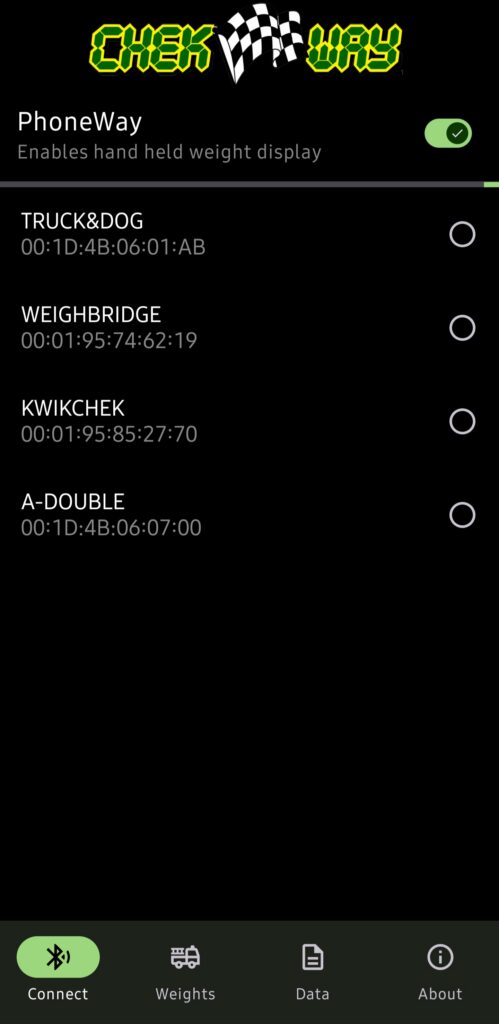
The Phone-WAY app provides seamless and secure wireless access to your weighing systems, eliminating manual searches and complex connection procedures as with other systems.
- One-Tap Activation and Discovery: Activating the feature is as simple as a single tap. Toggle the Phone-WAY button to ‘ON’, and the application performs an automatic scan of the surrounding area. Within moments, it populates a list of all detected CHEK-WAY®, KWIK-CHEK®, and WAY-BRIDGE® systems currently within range for you to select the one to connect.
- Simple and Secure Connection: From the list of available systems, simply tap on the name of the vehicle you wish to connect to, which is typically listed by its rego number for easy identification. To ensure data integrity and prevent unauthorized access, you will be prompted to enter a unique PIN.
- Instant Access to Live Data: Upon successful authentication, the app automatically navigates you directly to the live weights screen for that system. This streamlined process takes you from activation to viewing critical weight data in just a few seconds, maximizing your efficiency on the job.
Phone-Way: accurate Weights
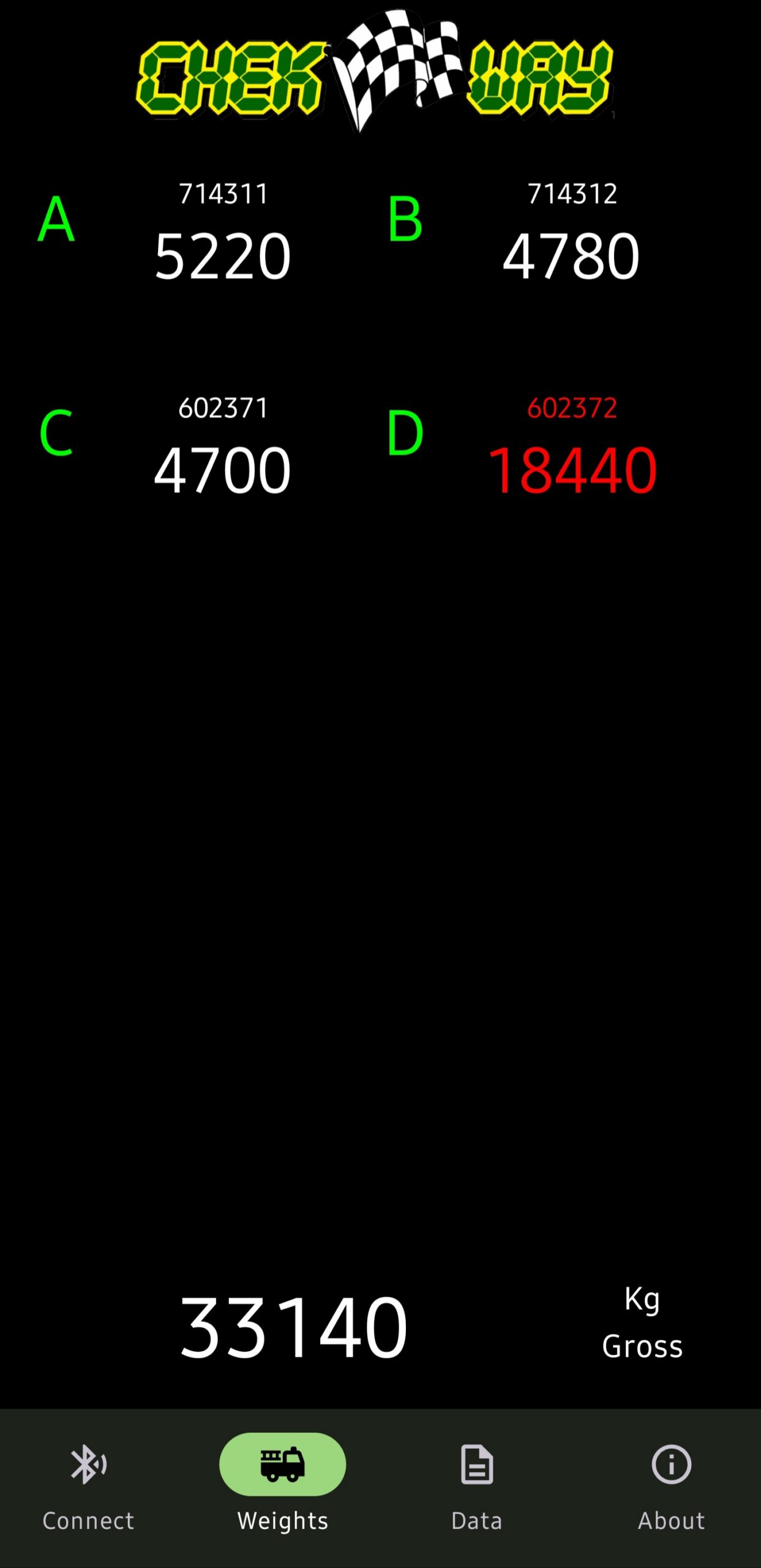
This is your main screen for viewing live weight data from the connected CHEK-WAY®, KWIK-CHEK®, or WAY-BRIDGE® system. It is designed for clarity and ease of use. The vehicle configuration used in the example (to the right) includes prime mover (channel A) and trailer and dolly groups (channel B, C, and D).
You can now see:
- Axle Group Weights: Each line item (e.g., Channel A, Channel B) displays the current weight on a specific group of axles on the vehicle.
- Total Gross Weight: The total combined weight of the entire vehicle is displayed prominently, usually at the bottom or top of the screen.
- Overload Indicator: If any axle group is overloaded, its weight will be highlighted in red. This is an immediate visual warning to check your load – as in channel D, the rear trailers axle group.
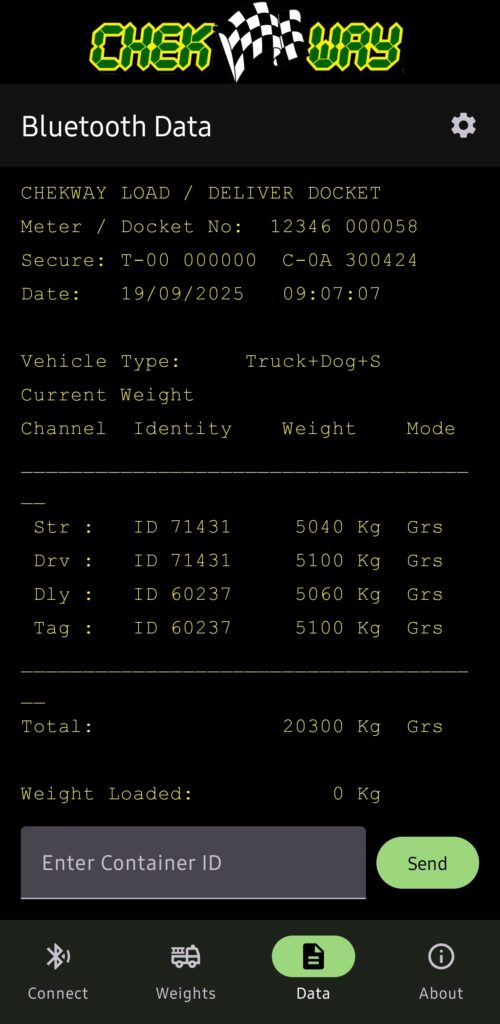
Phone-Way: data screen
Beyond live monitoring, the Data Screen is your central hub for managing all recorded information. It transforms your mobile device into a powerful tool for record-keeping and communication, eliminating the need for paper dockets.
- View and Manage Digital Dockets: Access a complete, scrollable history of all your dockets and other weight datas. Each digital docket provides a comprehensive record, including gross, net weights, date, time, location and vehicle details.
- Copy Data with a Tap: Seamlessly transfer information from a docket to another application. With the ‘Copy’ function, you can quickly copy details and paste it directly into an email, text message to dispatch, a job management app, or a digital logbook, ensuring accuracy and saving time.

Remember, You can not manage what you do not know.
Remember, Lost paper work presents a time consuming problem.
Remember, You now have the answer within your grasp.
Remember, The future in weighing is here now!
TRANSPORT SOLUTIONS FOR
TODAY AND TOMORROW